Inside a knowledge base: how RAG actually finds things
Parsing, chunking, embeddings, multimodal models and the index. A detailed, hands-on walk through the ingestion pipeline behind every “chat with your documents” product, for text and images alike.
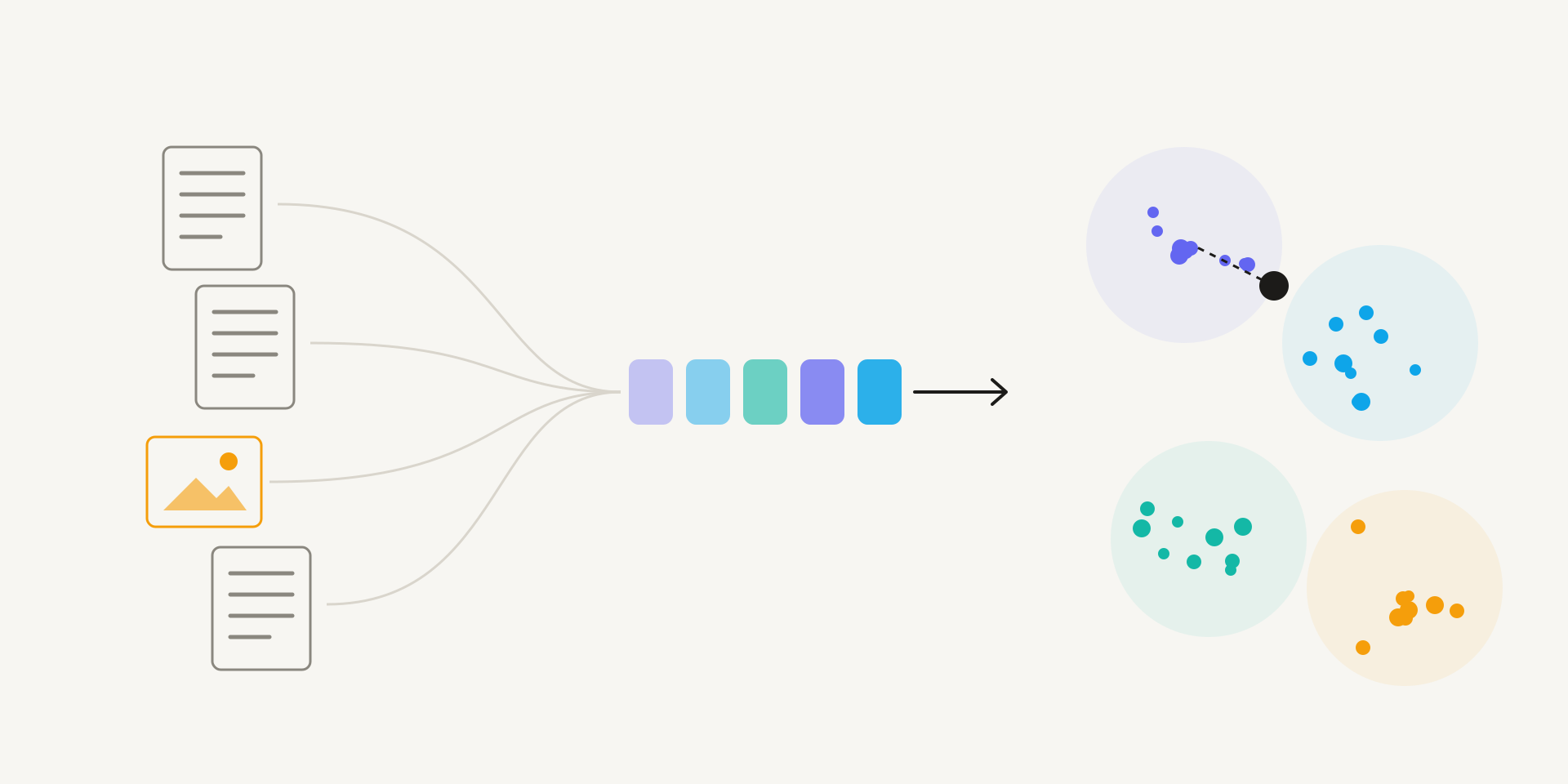
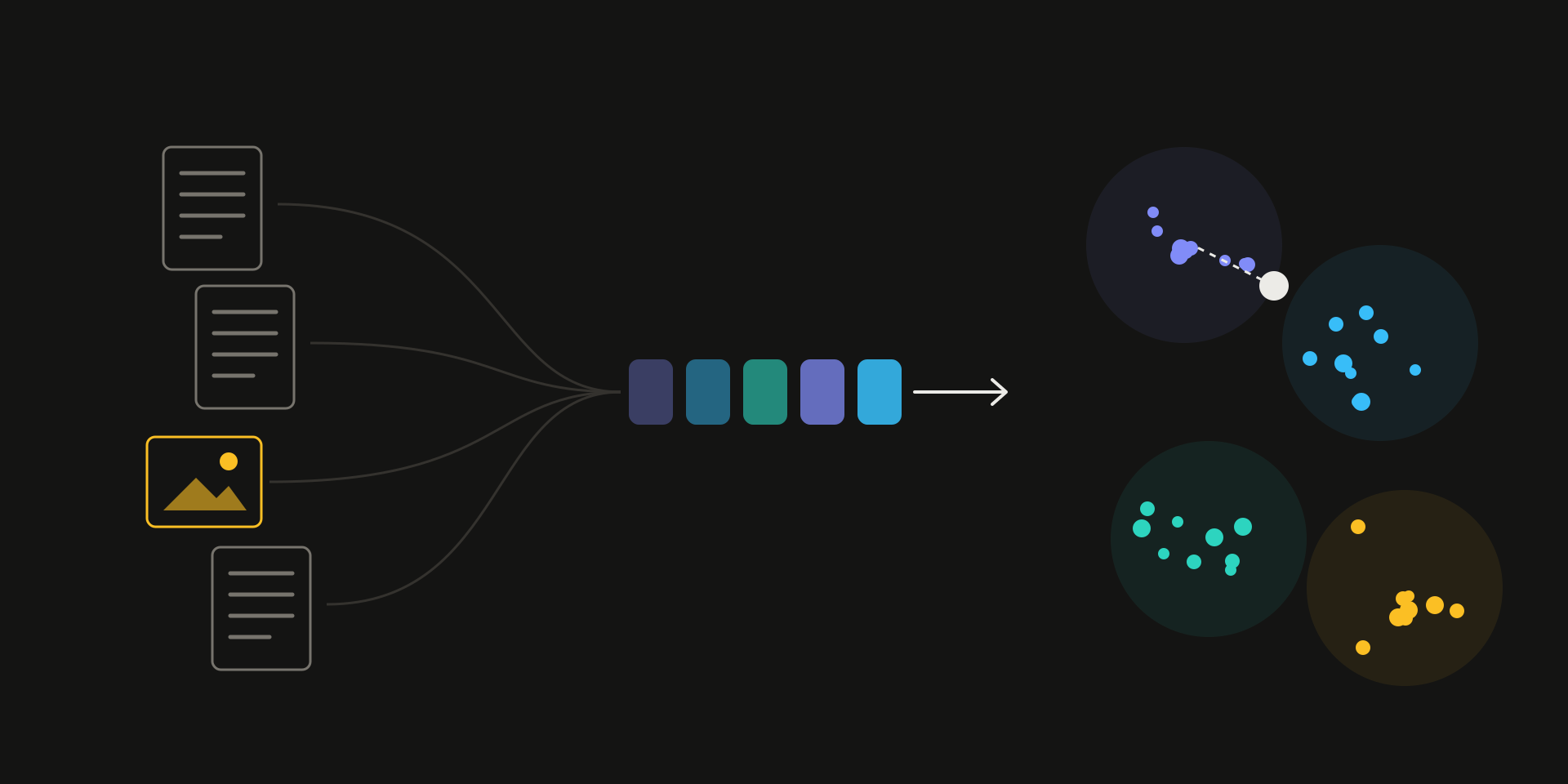
“Chat with your documents” sounds like one feature. It's really two systems. One runs ahead of time and turns a pile of files into something searchable. The other runs on every question: it searches, picks the best passages and hands them to a language model to answer from. That's retrieval-augmented generation, or RAG.
Almost everyone spends their time on the second half, because that's where the model is. But when a RAG system gives a bad answer, the cause is usually in the first half. The right passage was never found, because it was parsed badly, split in the wrong place, or embedded in a way the question could never match.
So this post is about the first half: the knowledge base. What happens to a file between the moment it's uploaded and the moment it can be found, and what changes when the file is a slide deck, a spreadsheet or a photo instead of plain text.
The ingestion pipeline
Every knowledge base runs some version of the same six stages. Pick a file type and click through them. The general job of each stage stays the same; what changes with the format is mostly parsing, chunking and embedding.
Parse
Turn the file into clean text plus structure: headings, lists, tables, page numbers. This is where most quality is won or lost.
Read the text layer, then rebuild reading order from the layout: columns, headers and footers removed, tables kept as tables.
# Returns policy
## 4.2 Damaged parcels
Refunds are capped at $50 per parcel…
| Item | Limit |  (table kept as markdown)
The order matters. Each stage can only work with what the previous one gave it. An embedding model can't recover a table that the parser flattened into a line of numbers, and no reranker can find a passage that was split in half.
Here's the shape of it in code. Real systems add queues, retries and batching, but the bones are these.
def ingest(source: Source) -> None:
    for file in source.changed_since(source.last_sync):
        if file.deleted:
            index.delete(where={"doc_id": file.id})
            continue

        doc = parse(file)                   # text + structure, OCR and captions if needed
        chunks = chunk(doc, max_tokens=400, overlap=50)

        for c in chunks:
            c.meta = {"doc_id": file.id, "title": doc.title, "section": c.heading_path,
                      "page": c.page, "updated": file.modified, "acl": file.readers}
        vectors = embedder.embed([c.text_for_embedding() for c in chunks])
        index.delete(where={"doc_id": file.id})   # replace, never append
        index.upsert(chunks, vectors)

    source.last_sync = now()
Two lines are worth a second look. index.delete before upsert means re-ingesting a file
replaces its old chunks instead of leaving stale copies behind. And the acl field is how the
knowledge base later answers only from documents the person asking is allowed to read.
Parsing is where quality is won
It's tempting to treat parsing as a solved problem: get the text out, move on. It's the stage where I've seen the most quality lost, because every format hides its meaning differently.
- PDFs are drawing instructions, not documents. The text is there, but in the order it was painted, not the order you read it. Two-column layouts interleave, headers and footers repeat on every page, and tables become a stream of numbers. A good parser rebuilds reading order from the layout and keeps tables as tables, usually as markdown.
- Web pages are mostly not content. Navigation, cookie banners, related links and footers can outweigh the article. Extract the main content, keep the headings.
- Slide decks carry meaning in pictures and speaker notes as much as in bullets. Keep the notes, and caption charts and diagrams.
- Spreadsheets split into two cases. A small lookup table (rates, limits, contacts) can be turned into sentences and embedded. A 50,000-row data table shouldn't be embedded at all; questions about it want a query, so give the model a SQL tool instead.
- Scans are pictures of text. Optical character recognition (OCR) with layout detection recovers the words. Keep the confidence score, and keep the page image so the answer can show it.
- Images have no text to parse. More on those below.
One habit that pays for itself: convert everything into one intermediate format, such as markdown with page markers, before chunking. Then every stage after parsing only has to handle one shape of input, and you can open the parsed output and read it, which is the fastest way to find parsing bugs.
Chunking: small enough to be specific, big enough to make sense
A chunk is the unit that gets embedded, retrieved and shown to the model. Too big, and one vector has to represent several ideas at once, so it matches none of them well. Too small, and the chunk loses the context that made it meaningful: “they are capped at $50” is useless if you don't know what “they” are.
Try it. Drag the size, then switch from fixed-size chunks to ones that follow the document's structure.
Returns policy
Customers can return most items within 30 days of delivery. Items must be unused and in the original packaging.
Damaged parcels
If a parcel arrives damaged, the customer should photograph it before opening. Refunds for damaged parcels are capped at $50 per parcel. Claims above that go to the claims team for review.
Lost parcels
A parcel counts as lost if tracking has not updated for ten working days. Lost parcels are refunded in full once the carrier confirms the loss.
Chunk 2 of 5 · 24 words
original packaging. Damaged parcels If a parcel arrives damaged, the customer should photograph it before opening. Refunds for damaged parcels are capped at
Cut mid-sentence. On its own, this chunk is harder to understand and to match.
Click any word to inspect its chunk. Darker words appear in two chunks (overlap).
Fixed-size chunking is simple and predictable, and it cuts sentences in half. Overlap patches this, so each cut sentence appears whole in at least one chunk, at the cost of storing some text twice. Structure-aware chunking starts a new chunk at each heading and only splits long sections at sentence ends. It needs a parser that kept the structure, which is one more reason parsing matters.
A few things that help, whichever strategy you use:
- Start around 200 to 500 tokens and tune with real questions, not intuition.
- Prepend the heading path to the text you embed: “Returns policy › Damaged parcels: Refunds are capped at $50…”. The chunk now says what it's about, even out of context.
- Keep tables, code blocks and list items whole. Splitting a table row from its header destroys it.
- Store a pointer to the neighbours, so at answer time you can widen a hit to include the chunk before and after if the model needs more.
What an embedding actually is
An embedding model reads a piece of text and outputs a fixed-length list of numbers, a vector, typically with somewhere between 384 and 3,072 dimensions. Each number on its own means nothing. What matters is where the vector points.
The model has been trained so that texts with similar meaning point in similar directions. “My parcel arrived crushed” and “refunds for damaged parcels” share almost no words, but their vectors end up close together. That's the whole trick: it lets you search by meaning instead of by keyword.
Closeness is usually measured with cosine similarity, the angle between two vectors. 1.0 means the same direction, 0 means unrelated. To search, you embed the question with the same model and find the stored vectors nearest to it.
Pick a question and watch where it lands. Then switch to a text-only model and see what happens to the images.
- 0.80 Photo: a box with a crushed corner
- 0.78 Photograph a damaged parcel before opening it
- 0.77 Claims above $50 go to the claims team
Illustrative: real embeddings have hundreds of dimensions, squashed here to two. Scores are cosine similarity.
A few things that diagram leaves out, and that bite in practice:
- Same model, both sides. Vectors from different models live in different spaces. You can't compare a query embedded with one model to documents embedded with another, and you can't mix them in one index. Changing the embedding model means re-embedding everything.
- Queries and passages are different shapes. A question is short; a passage is long and
declarative. Many models are trained for this asymmetry and expect a prefix or a separate mode,
such as
query:andpassage:. Skipping it quietly costs accuracy. - Normalise. If vectors are normalised to length 1, cosine similarity becomes a plain dot product, which is what most vector indexes are fastest at.
- Scores are relative. A similarity of 0.62 isn't good or bad by itself. It only means something compared to other scores from the same model, so tune thresholds per model.
- Meaning isn't everything. Embeddings are weak at exact things: part numbers, error codes, names and rare jargon. That's why the index below also keeps a keyword search.
Choosing an embedding model
There's no single best model, but there are a handful of questions that narrow it down fast.
| Question | Why it matters |
|---|---|
| Does it handle your languages? | Many strong models are English-first. Multilingual models put a question in one language near the answer in another. |
| How long an input does it take? | Older models truncate at 512 tokens. Anything past the limit is silently ignored. |
| How many dimensions? | More can mean better recall, but every vector costs memory and search time. Some models let you truncate vectors to trade quality for size. |
| Text only, or images too? | A multimodal model puts text and images in one space. A text model needs images captioned first. |
| Hosted API or self-hosted? | APIs are easy to start with. Self-hosting keeps documents in-house and makes costs predictable at volume. |
| How does it do on your data? | Public leaderboards are a starting point. Fifty real questions with known answers from your own documents tell you more. |
The last row is the one that matters. Build a small set of real questions and the passages that should answer them, and measure how often the right passage appears in the top five. Swap models, chunk sizes and parsers against that, and the decisions make themselves.
Embedding images
Text is the easy case. A lot of what organisations know lives in diagrams, screenshots, scanned forms, slides and photos. There are three ways to make those searchable, and they combine well.
1. Turn the image into text. Run OCR for any words in the image, and ask a vision-language model to describe it: “a cardboard box with a crushed corner on a doorstep, label partly torn”. Embed that description with the same text model as everything else. It's simple, it works with any text embedding model, and the description doubles as something the answering model can read. The weakness is that the search can only ever find what the caption mentioned.
2. Embed the pixels directly with a multimodal model. Models trained on image and caption pairs, CLIP being the well-known example, learn one shared space for both. A photo of a crushed box lands near the sentence “my parcel arrived damaged” without anyone writing a caption. This catches things a caption would miss, and lets people search with an image as the question. It's weaker at fine print, since these models see an image as a whole rather than reading it.
3. Embed whole pages as images. For visually dense documents (slides, forms, reports full of charts) newer document-retrieval models skip parsing entirely and embed a screenshot of each page, keeping layout, charts and text together. It's the most robust to messy formats and the most expensive to store and search.
In practice I'd start with the first, because it fits into the text pipeline you already have, add the second for collections where images matter (product photos, damage reports, diagrams), and keep the original image with every chunk so the answer can show it.
def image_chunks(img: ImageFile) -> list[Chunk]:
    text = ocr(img)                                   # words in the picture, if any
    caption = vlm.describe(img, hint=img.surrounding_text)
    chunk = Chunk(text=f"{caption}\n{text}".strip(), kind="image", source=img.url)
    chunk.vectors = {
        "text": text_embedder.embed(chunk.text),      # found by words
        "image": clip_embedder.embed_image(img),      # found by what it looks like
    }
    return [chunk]
One thing to watch for: if you store both kinds of vector, search each against a query embedded by the matching model (text model for the text vector, the multimodal model's text encoder for the image vector) and merge the results. Never compare across them.
The index: meaning and keywords together
The vectors go into a vector index. Comparing a query against millions of vectors one by one is too slow, so these indexes use approximate nearest-neighbour search. The most common, HNSW, builds a layered graph you can walk towards the nearest points in a few hops. You trade a tiny amount of recall for answers in milliseconds.
Next to it sits a plain keyword index (BM25), the same kind of search engines have used for decades. It's what finds “error E4012” or a product code that embeddings blur. The two lists are merged, most simply with reciprocal rank fusion: score each result by its position in each list, and add the scores up.
def rrf(*rankings: list[str], k: int = 60) -> list[str]:
    score: dict[str, float] = {}
    for ranking in rankings:
        for pos, doc_id in enumerate(ranking):
            score[doc_id] = score.get(doc_id, 0) + 1 / (k + pos + 1)
    return sorted(score, key=score.get, reverse=True)
Finally, a reranker looks at the top 20 to 50 candidates together with the question and reorders them. It's a slower, more careful model that reads both at once instead of comparing precomputed vectors, so it's only run on the shortlist. It's often the single biggest quality improvement you can add after the basics work.
Keeping it fresh
A knowledge base isn't built once. Documents change, get deleted and get re-shared, and each of those has to flow through:
- Sync incrementally. Track a checksum or modified time per file, and only re-process what changed.
- Delete properly. When a document is removed or someone loses access, its chunks must leave the index, not just drop in rank.
- Version your embeddings. Store which model and which parser produced each vector. When you upgrade either, re-embed into a new index alongside the old one, compare on your test questions, then switch.
What to take away
When a RAG answer is wrong, look at the knowledge base before the model. Open the parsed text. Look at the chunks it retrieved. Check whether the right passage was in the index at all, and how it ranked.
The model gets the attention, but it can only answer from what it's handed. Getting it the right passage, cleanly parsed, sensibly split and embedded so a real question can find it, is most of the work. It's also most of the difference.