One assistant, every surface
Web, mobile, desktop, Slack and Teams — one assistant, one set of policies, one conversation history. What it takes to make an assistant feel like the same colleague wherever people find it.
Most enterprise assistants launch in one place: a web app. People log in, ask questions, get answers with citations. It works, and almost nobody uses it as much as its builders hoped.
The reason is obvious once you watch people work. Nobody in a busy office spends their day in a separate AI web app. They spend it in Teams, or Slack, or email, or on their phone between meetings. Asking them to switch to a separate tab to ask a question is asking them to change how they work. Most people, reasonably, don't.
So the assistant had to go where people already were. That part is easy to say. The hard part is that it had to be the same assistant everywhere: same permissions, same policies, same memory of what you were just talking about. If you ask something in Teams in the morning and follow up on your phone in the afternoon, it should know what "that report" means.
This post is about the conversation layer that makes that true across web, mobile, desktop, Slack and Teams, and about how people tend to use an assistant once it is everywhere.
The tempting mistake: five bots
The fastest way to be on five surfaces is to build five integrations. A Slack bot that calls the model. A Teams bot that calls the model. A mobile app that calls the model. Each one with its own little session store, its own prompt tweaks, its own idea of who the user is.
A prototype built that way usually falls apart within weeks, in very predictable ways:
- the Slack version and the web version give different answers to the same question, because someone tuned the Slack prompt to be shorter and it stopped citing sources
- a policy change, disabling one tool for one tenant, is applied to web and forgotten on Teams
- a user asks a follow-up in Teams about a conversation they started on the web, and the bot has no idea what they mean
Each of those is a small bug. Together they mean you don't have an assistant, you have five cousins who don't talk to each other. In an enterprise, the policy drift alone is disqualifying.
One core, thin adapters
The architecture that works is simple in shape. There is one conversation core that owns everything that matters: identity, policy, memory, retrieval, tool calls and the model. Every surface is a thin adapter whose only jobs are to translate events in and render answers out.
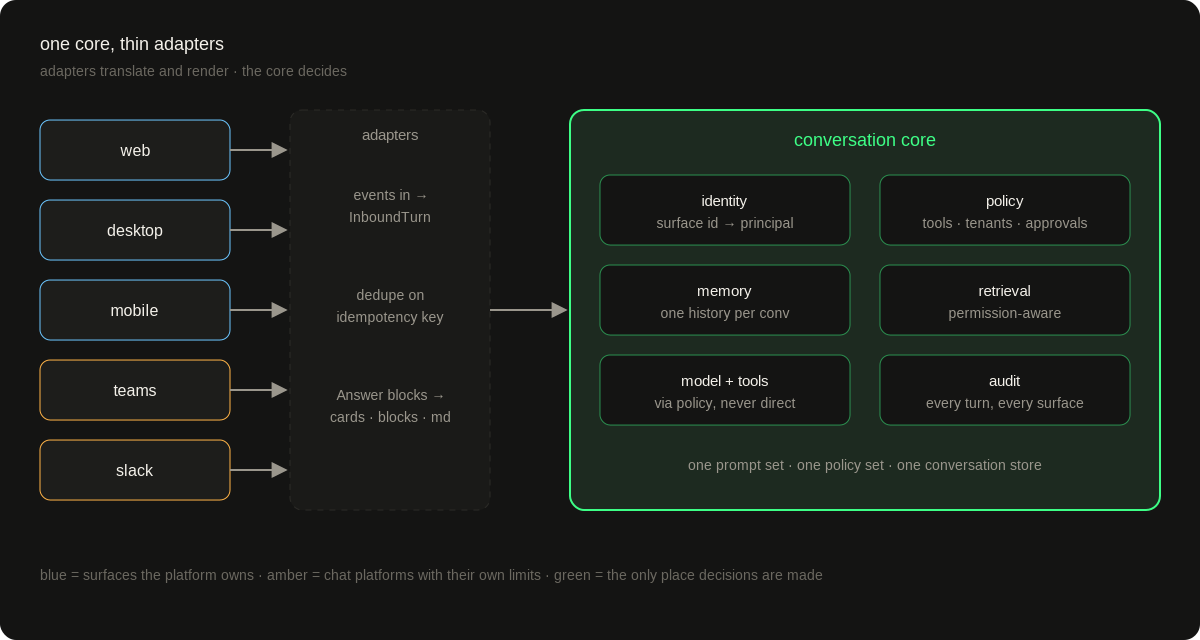 Adapters translate and render. Everything that decides anything lives in the core, once.
The rule worth enforcing in review is blunt: if an adapter contains an if about what the assistant
is allowed to do, it's in the wrong place. Adapters can know how to draw a card in Teams. They
cannot know which tools a tenant has enabled.
The contract between adapters and the core is two message types. Everything coming in is normalised into a turn; everything going out is a surface-neutral answer.
export type Surface = "web" | "mobile" | "desktop" | "slack" | "teams";

export interface InboundTurn {
  surface: Surface;
  externalUserId: string;        // slack U0..., teams AAD object id, web session subject
  externalThreadId?: string;     // slack thread_ts, teams conversation id
  text: string;
  attachments: AttachmentRef[];  // fetched later by the core, with the user's permissions
  replyTo?: string;              // the message being answered, if the surface supports it
  receivedAt: string;
  idempotencyKey: string;        // platforms retry; the core dedupes
}

export interface Answer {
  conversationId: string;
  blocks: Block[];               // paragraph | list | table | citation | action | approval
  citations: Citation[];
  pendingApproval?: ApprovalRequest;
  final: boolean;                // false while streaming
}
The idempotencyKey earns its place quickly. Slack and Teams both retry webhook
deliveries if you are slow to acknowledge, and an assistant that answers the same question twice
looks broken in a way that's hard to explain to a user.
Who is this person?
Before the core can do anything, it has to know who it's talking to. On the web that's easy: the platform issued the session. On every other surface, the user arrives with someone else's identifier — a Slack user ID, a Teams object ID from the organisation's directory, a device token on mobile.
Permissions only mean something if all of those resolve to the same person in the platform. So the first thing every inbound turn does is go through identity mapping.
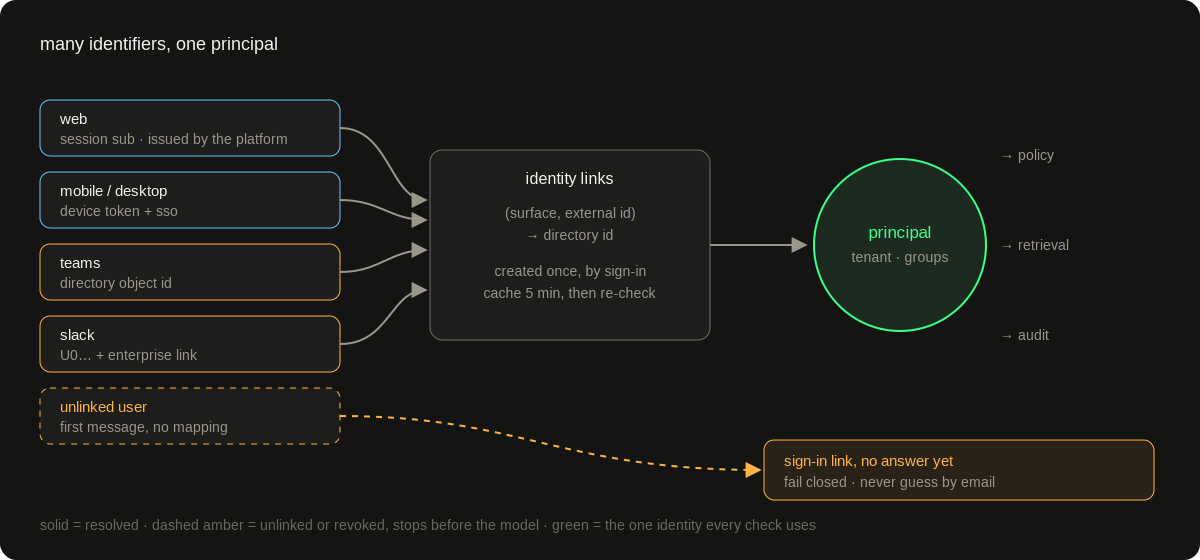 Every surface brings its own ID. All of them must resolve to one principal before the core will answer.
The rules that hold up:
- Link once, explicitly. The first time someone uses the assistant in Slack or Teams, they get a one-time link to sign in with the organisation's identity provider. That creates the mapping. Never guess based on display names or email addresses typed into a profile.
- Prefer directory IDs over emails. Emails change and get recycled. The directory object ID doesn't. Teams gives you one directly; for Slack, use the enterprise identity link when the workspace has it.
- Fail closed. An unmapped user gets a polite message and the link, not a degraded anonymous assistant. An assistant with no identity has no permissions, and one with no permissions is just a chatbot that can leak nothing — which sounds safe until people start pasting documents into it.
- Re-check on every turn. Mappings are cached for minutes, not days. When someone leaves the organisation, their Teams account is disabled first, and the assistant has to notice.
async def resolve(turn: InboundTurn) -> Principal:
    key = (turn.surface, turn.externalUserId)

    cached = await cache.get(key)
    if cached and cached.checked_at > now() - timedelta(minutes=5):
        return cached.principal

    link = await links.find(turn.surface, turn.externalUserId)
    if link is None:
        raise NotLinked(sign_in_url=links.start(turn.surface, turn.externalUserId))

    principal = await directory.principal(link.directory_id)  # live check
    if principal is None or principal.disabled:
        raise AccessRevoked()

    await cache.set(key, Cached(principal=principal, checked_at=now()))
    return principal
One conversation, many threads
The next question is what "the same conversation" means across surfaces. A Slack thread, a Teams chat, a web conversation and a mobile session are different things with different lifetimes.
It helps to separate two ideas. A thread is whatever the surface calls a conversation: a Slack thread, a Teams reply chain, a web conversation tab. A conversation belongs to the platform: a sequence of turns with one history, one set of retrieved context and one owner. Usually one thread maps to one conversation. But a user can explicitly continue a conversation somewhere else, and then two threads point at the same conversation.
In practice the most common handoff is simple: someone starts something in Teams at their desk, then picks it up on the mobile app later. The mobile app shows recent conversations from every surface, labelled by where they started. Tap one, and you continue with full history.
The less common, and more interesting, handoff is into a shared space. Someone asks the assistant privately to draft a summary, then wants to post it in a team channel. That crosses a permission boundary: what the user can see is not necessarily what everyone in the channel can see. So "share to channel" is a tool call like any other, and the policy layer checks whether the cited sources are visible to the channel's members before it is allowed through.
Rendering: same answer, different shapes
The core produces a surface-neutral answer made of blocks: paragraphs, lists, tables, citations, action buttons, approval requests. Each adapter decides how to draw them.
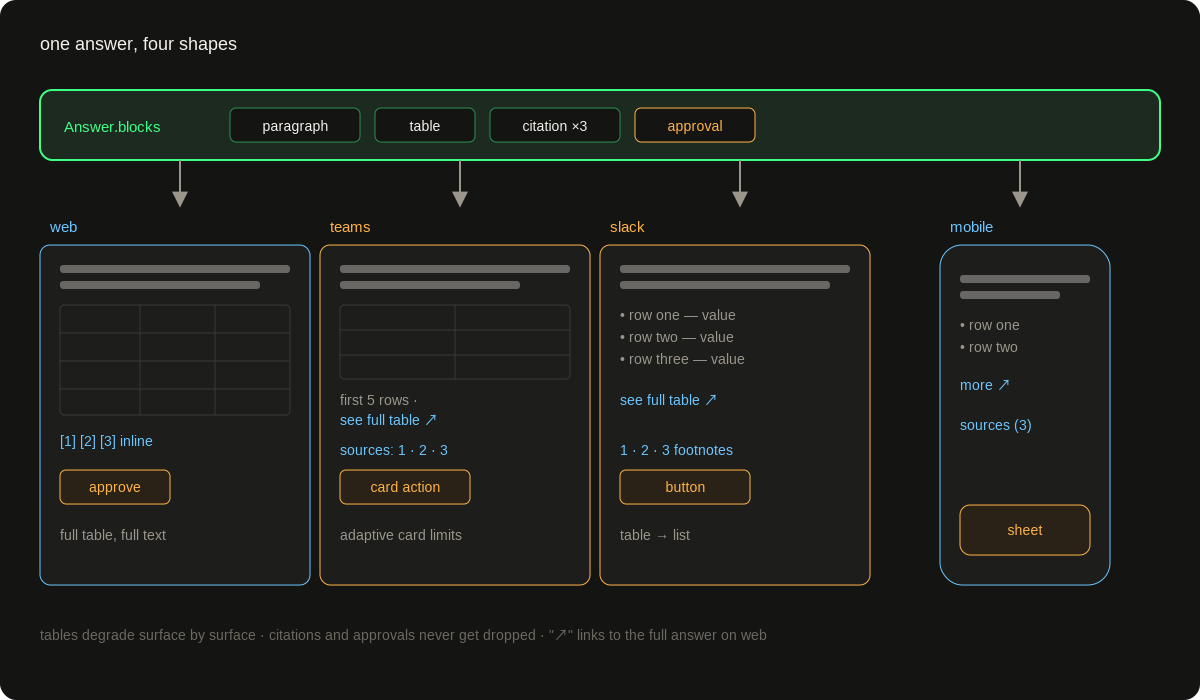 One block list from the core; four renderings. Citations and approvals survive everywhere, even when tables don't.
This sounds like a formatting problem and turns out to be a product problem. Each surface has hard limits, and hitting them silently is how you end up with an answer that is technically delivered and practically useless.
| Surface | Rich answers as | Streaming | Hard limits you hit | Approvals |
|---|---|---|---|---|
| Web | full markdown, tables, inline citations | token stream | none worth mentioning | inline buttons |
| Desktop | same renderer as web | token stream | offline: queue and say so | inline buttons |
| Mobile | condensed markdown, tables become lists | token stream | small screens: long tables unreadable | native sheet |
| Teams | adaptive cards | edit the message in chunks | card size limits, update rate limits | card actions |
| Slack | blocks with mrkdwn | edit the message in chunks | block count and text length limits, rate limits | block buttons |
Three rules make rendering manageable:
- Citations are non-negotiable. If a surface can't show a citation inline, it shows a numbered list at the end. An answer without its sources is not allowed to go out anywhere.
- Degrade, then link. If an answer is too big for a surface — a large table, a long document draft — the adapter renders a short summary and a link to the full answer on the web. Better a clear "see full table" than a truncated card that looks complete.
- Approvals render natively. When an action needs a human to approve it, the approval appears as a real button on that surface, and the decision goes back through the core. Nobody should have to switch apps to say yes.
Streaming without getting rate limited
On the web, streaming is easy: tokens arrive, tokens appear. In Slack and Teams there is no token stream. You post a message and then edit it, and both platforms will rate limit you if you edit too often.
So the chat adapters buffer. They post a short placeholder immediately — users need to see that something is happening within a second or two — then flush the accumulated answer on a timer, growing the interval as the answer gets longer. When the core says the answer is final, the adapter does one last edit with the fully formatted version.
export async function streamToChat(
  post: PostFn, edit: EditFn, answers: AsyncIterable<Answer>, limits: SurfaceLimits,
) {
  const msg = await post(placeholder());   // within ~1s, or users think it's broken
  let lastFlush = Date.now();
  let interval = limits.minEditIntervalMs;

  for await (const answer of answers) {
    const due = Date.now() - lastFlush >= interval;
    if (!answer.final && !due) continue;

    await withRetry(() => edit(msg, render(answer, limits)), {
      on429: (retryAfterMs) => (interval = Math.max(interval * 2, retryAfterMs)),
    });
    lastFlush = Date.now();
    interval = Math.min(interval * 1.5, limits.maxEditIntervalMs);  // longer answers, fewer edits
  }
}
The retry handler matters as much as the timer. When a platform sends back a rate-limit response, the adapter slows down for that conversation instead of failing the answer. Users see a slightly less smooth stream. They never see an error.
When a platform has a bad day
Chat platforms have outages, slow periods and quiet API changes, and none of them are yours to fix. The core never waits on a surface. Answers are written to the conversation store first and delivered second, so if Teams is slow to accept a message, the answer still exists and the adapter keeps retrying delivery with backoff. If delivery fails for long enough, the user gets a notification on another surface they use, pointing at the answer on the web.
Webhook retries cut the other way. When your acknowledgement is slow, platforms resend the same event, sometimes several times. The idempotency key on every inbound turn means the core processes it once and quietly drops the copies. Without it, a slow model response can produce two or three identical answers in a thread, which users reasonably read as the assistant being confused.
Each adapter also has its own budget for outbound calls per workspace, so one busy tenant posting long answers in a large channel can't exhaust the rate limit everyone else in that workspace shares.
What people actually do
Once an assistant is everywhere, usage tends to look nothing like the plan.
- The workplace chat app becomes the main surface. The web app becomes the place for long work: drafting documents, reviewing long answers, managing approvals.
- Mobile is for follow-ups, not new questions. Short messages, mostly continuing something started at a desk.
- Channel mentions grow slowly, then quickly. Asking the assistant in front of colleagues feels risky at first. Once a few people do it and the answers are good — and visibly cited — it becomes normal to tag it in a team discussion.
- Approvals move to wherever people are. Approving an action from a chat card on a phone is far more common than opening the web app to approve.
The biggest change in usage rarely comes from a new model or a better prompt. It comes from being one click away inside the tool people already have open.
What I'd recommend
- Build the neutral answer format first. Starting with markdown as the interchange format is tempting, and painful to unpick later. Blocks with explicit types are much easier to render well on every surface.
- Treat identity linking as onboarding, not plumbing. The sign-in link is the first thing a new user sees in Teams. Under-design it and it shows.
- Budget for platform limits early. Every chat platform has size and rate limits that you only discover with real answers. A test suite of "the longest answer the assistant has ever produced", rendered on every surface, saves several awkward bug reports.
- Keep the adapters boring. Every time logic crept into an adapter, it eventually disagreed with the core. The thinner the adapter, the fewer surprises.
An assistant that lives in one place is a tool people visit. One that lives everywhere, and behaves the same everywhere, starts to feel like a colleague. The model is the same in both cases. The difference is all in the layer around it.